Ledgerman for Jira Cloud

Portfolio budgets from contracts and acceptance certificates, not timesheets

For PMOs and finance controllers who keep project budgets in a spreadsheet next to Jira. Ledgerman tracks each project's budget, the contracts that commit it and the certificates that prove delivery, by month and by calendar year.

Free for sites with up to 10 users. Runs on Atlassian: your financial data stays in your Atlassian site.

Project ALPHA · 2026 Example · EUR
Budgetapproved, phased by month1,200,000.00
Committedcontracts, this year's allocation900,000.0075%
Actualsacceptance certificates540,000.0045%
Uncommitted budget300,000.00
Open commitment360,000.00
75% committed · 45% utilisation Nothing here comes from worklogs

Budget → Committed → Actuals

Three layers of money, counted the way a PMO already counts them

Most budget apps for Jira turn logged hours into cost. Ledgerman works from the documents your finance team already signs.

Layer 1

Budget

Each project's approved budget for a calendar year, phased by month. Break it down by category, such as Licences or Services, if you need to.

Layer 2

Committed

Contracts with vendors. Each contract's value is phased across the years it runs, so it counts against the right year's budget. A contract can be a Jira issue.

Layer 3

Actuals

Acceptance certificates: dated amounts of delivered work, each posted against one contract. They are your actuals.

Uncommitted budget
Budget minus committed. Below zero, the project is over-committed for the year.
Open commitment
Committed minus actuals: what vendors are still owed delivery on.
Utilisation and % committed
Actuals and committed as a share of budget, recomputed for the portfolio, never averaged.
Monthly budget vs actuals
The variance each month and cumulative utilisation year to date.

Annual phasing

A contract signed in December counts in the years it is delivered

Budgets are approved per calendar year. Contracts don't follow the calendar. In Ledgerman each contract carries an annual phasing that must add up to its value, and each year's budget is measured against that year's allocation, whatever the signing date.

Certificates fall into a year and month by their date, so you always see what was delivered against what was allocated.

Example contract D-2025/031 · signed 12 Dec 2025 · 300,000.00 EUR
2025
0.00nothing to deliver
2026
180,000.0095,000.00 accepted
2027
120,000.000.00 accepted
Allocation for the year Accepted by certificates
Phasing total 300,000.00 Equals the contract value

Five checks

The errors your budget spreadsheet hides

Ledgerman records the documents as they are entered and points out where they disagree with each other or with the budget. It never corrects them silently.

  • Annual phasing doesn't add upA contract's allocations across the years differ from its value.
  • Actuals over the contract valueCertificates on a contract add up to more than the contract is worth.
  • Actuals over the year's allocationA year's certificates exceed what the contract allocated to that year.
  • Certificate outside the contract datesWork accepted before the contract started or after it ended.
  • Committed over budgetA project's contracts for a year exceed its budget, or a category's budget when the budget is broken down.

Close the books. Set the month your books are closed through, and its budget amounts and certificates are locked. Only people with the "Change closed periods" permission can change them, and every change goes into the audit log.

Who it's for

Built for the people who answer for the budget

PMO lead

Every month you rebuild the portfolio picture from a workbook and a pile of certificates.

  • A dashboard and a portfolio view of every tracked project's budget, committed and actuals for the year.
  • All problems in one list, labelled with their project.
  • Export the year to Excel, or the dashboard to PDF for the steering committee.
Finance controller

You need to know what is already committed, not only what has been spent.

  • Uncommitted budget and open commitment per project and year.
  • A vendor register, closed periods and an audit log with every old and new value.
  • Recording certificates is a separate permission from editing contracts.

Project manager

You want your project's money in Jira, without asking the PMO for the spreadsheet.

  • A Financials tab on the Jira project: budget by month, contracts with their open balance, certificates.
  • Budget against actuals month by month, with the variance.
  • Contract issues get a Ledgerman tab with value, actuals to date and open balance.

Excel in, Excel out

Bring your workbook. Keep Excel for reporting.

Import

Upload your budget workbook. A preview shows what will be created, updated or left unchanged, and the rows to fix first, with sheet, row and column. Import never deletes, and running it again is safe.

Export

A project, a portfolio year or all your data to Excel. The acceptance register and the audit log to CSV. Contract statements and a dashboard snapshot to PDF. The full export imports back unchanged.

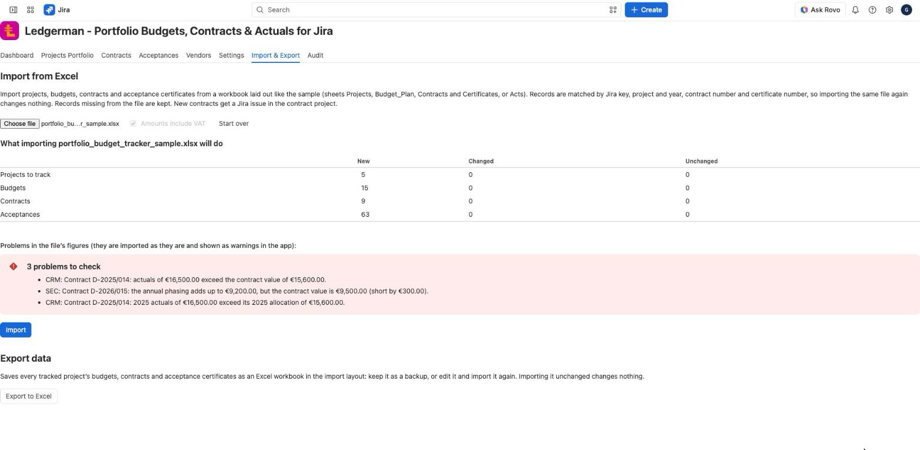
Ledgerman Excel import preview listing records to create, update or leave unchanged, and the problems found in the workbook.
The import preview: records to create, update or leave unchanged, and the workbook's own figure problems.

Inside Jira

It lives where your projects already are

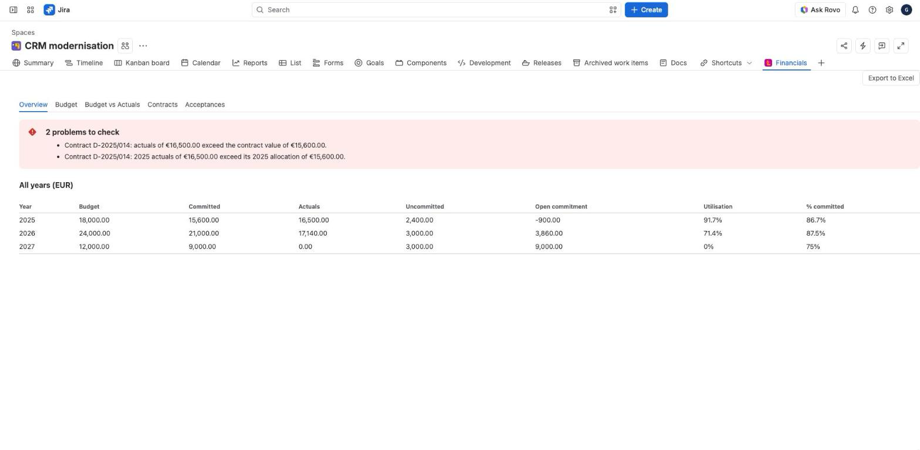
Jira project page with the Ledgerman Financials tab, showing each year's budget, committed, actuals and utilisation.
A project's Financials tab: budget, committed, actuals, uncommitted budget, open commitment and utilisation for every year side by side.
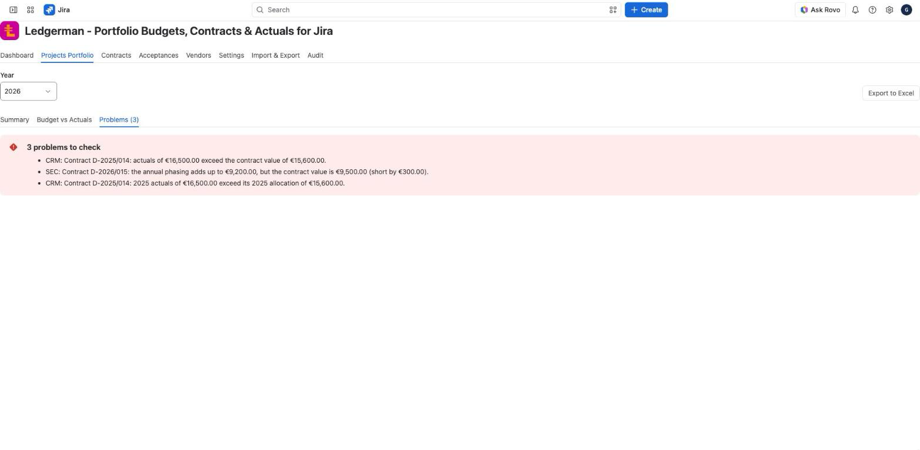
Ledgerman portfolio Problems list with warnings for a contract with actuals over its value and annual phasing that does not match the contract value.
The portfolio's problems: each mismatch between contracts, certificates and budgets, labelled with its project.
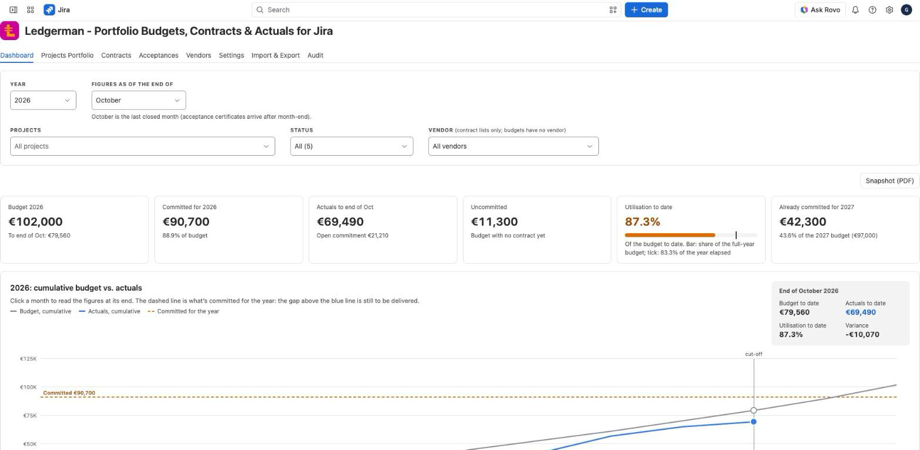
Ledgerman portfolio dashboard with cumulative budget against actuals, each project's budget, vendors and contracts that need attention.
The portfolio dashboard as of the last closed month: cumulative budget against actuals, projects, vendors and contracts that need attention.

Access follows Jira permission schemes. Ledgerman adds its own permissions to Jira: view project financials, edit the budget, edit contracts, record acceptance certificates and change closed periods, plus view portfolio, manage vendors and manage categories across the site.

Read the documentation

Security and data

Your financial data stays in your Atlassian site

Ledgerman runs on Atlassian. It has no servers of its own, and Sideshore doesn't see your budgets, contracts or certificates in normal operation.

Stored by Atlassian

All Ledgerman data is kept in Forge SQL, Atlassian-hosted storage tied to your Jira site. It follows your site's data residency and moves with it.

Acts as the signed-in user

Ledgerman calls Jira as the person using it, so Jira's own permissions apply. It can't read or change anything that person couldn't.

No names or emails stored

The only personal data Ledgerman records is the Atlassian account ID of whoever made a change. Names are looked up when the audit log is shown.

When you uninstall

Export everything to Excel first if you want a copy. Atlassian keeps the app's data for 28 days after uninstalling, then deletes it.

Every Jira permission Ledgerman asks for, and why
ScopeWhat Ledgerman does with it
read:jira-workChecks your permissions before showing or changing anything; lists projects and issue types for setup; reads the contract, certificate and vendor issues it links to, to show their status.
write:jira-workCreates a Jira issue for a new contract, certificate or vendor when an administrator has chosen a project for them, and marks linked issues so they show the Ledgerman tab. It doesn't edit or delete your issues.
write:project.property:jiraMarks a project as tracked so it gets the Financials tab. Used instead of a broader scope that could change project settings.
delete:project.property:jiraRemoves that mark when a project is no longer tracked. Its financial data is kept.
read:jira-userShows people's display names on the Audit tab.

Security, privacy and data residency · Privacy policy

Before you install

What Ledgerman doesn't do

If your costs are mainly people's time, a timesheet-based app will suit you better. Ledgerman is for money that moves through contracts.

  • Cost from worklogs or hourly rates
  • Revenue, billing or margin
  • Currency conversion: one currency per site; contracts in another currency are flagged and left out of totals
  • Forecasts, CapEx/OpEx classification or alerts
  • Splitting one contract across several projects or budget categories
  • Connections to accounting systems

Pricing

Free for small sites. Simple above that.

$0 up to 10 users

Larger sites pay per user per month through the Atlassian Marketplace, which bills for every user on the Jira site. The price per user falls as the site grows: about $1,000 a year at 100 users.

USD per user per month, monthly billing
Users on the sitePer user
1–10free
11–100$1.00
101–250$0.50
251–1,000$0.20
1,001–2,500$0.10
Above 2,500from $0.06 down to $0.02

Annual subscriptions cost ten times the monthly price. The Marketplace listing shows the current price for your site.

Support

Talk to the people who build it

Documentation

Public guides for users and Jira administrators, from setup to the Excel layout.

Open the documentation

Support portal

First response within one business day.

Ask a question

Demo

See Ledgerman with a sample portfolio, or with your own workbook.

Book a demo

Replace the budget spreadsheet, keep the discipline

Import your workbook, see its problems, and check this year's numbers in Jira.